LuaRover
Teaching real Lua by driving a rover
LuaRover is an educational app that sits between block based tools and a bare code editor. A student writes actual Lua and every instruction moves a rover on a grid immediately, with the whole project running locally so it works on an old phone or with no internet connection at all.
- Run anywhere, connection or not. The whole toolchain, editor, Lua engine and lesson content, has to work on a five year old phone or a school laptop with no internet, not just a fast desktop with a stable connection.
- Make every line visible. Instead of printing to a console, each instruction a student writes moves something on screen immediately, so the connection between code and result doesn’t have to be imagined.
Neither blocks nor bare code editors are quite right
Programming education for kids mostly splits into two camps: block based tools like Scratch and Blockly are friendly but never let a student read or write real syntax, while syntax first apps like SoloLearn and Mimo run the code on a server, so feedback is a line of text in a console and the app is useless without a connection. The closest match is Hour of Code, which pairs real instructions with a character moving through a maze, but it needs a desktop browser and a stable connection and doesn’t hold up on a phone or offline.
Also, the nearest existing Dart package, lua_dardo, reimplements the Lua VM instead of binding the official C engine, is stuck on Lua 5.3, has no debugger, and hasn’t been updated in years, which is the reason lua_native exists as its own package.
Three components, one experience
- lua_native: binds the official Lua 5.5 engine into Dart, through FFI on native platforms and WebAssembly in the browser. Not a reimplementation of the language, the real C engine.
- lua_rover client: a Flutter app built around a minimal CQRS game engine. Every step of a run is recorded as a frame, so a student can replay and scrub through what already happened.
- LuaRoverBackend: an ASP.NET Core service in Clean Architecture, handling accounts through JWT and generating the multilingual lesson content the client downloads.
The editor, the grid and the debugger, side by side
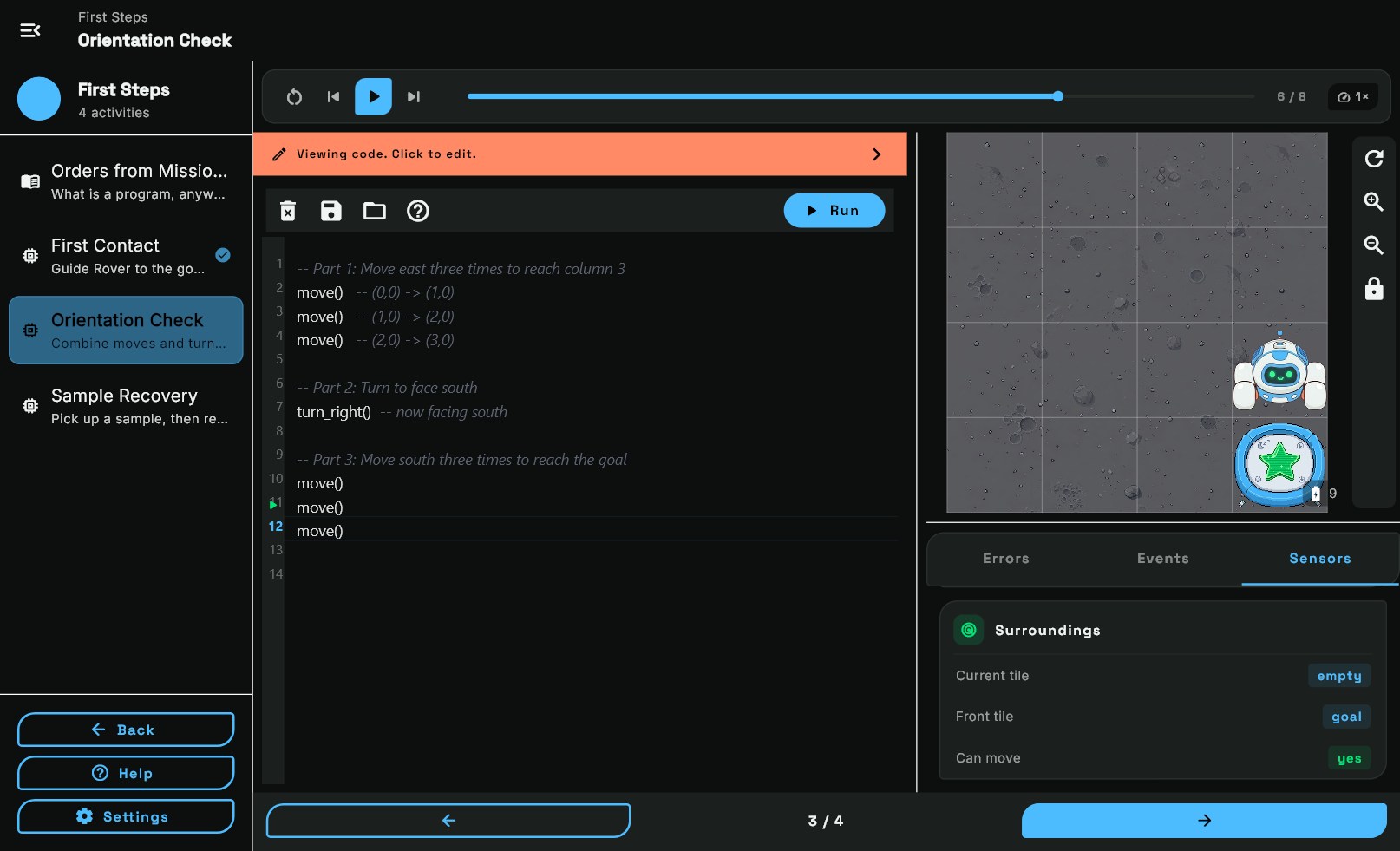
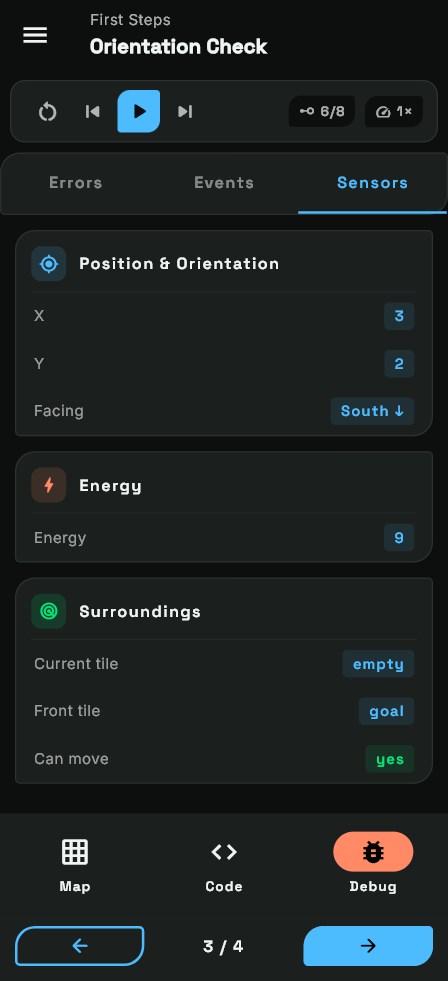
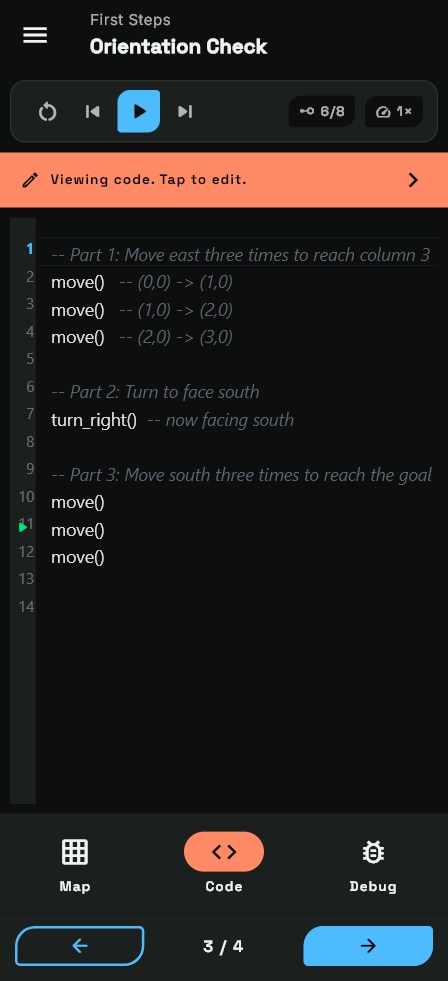
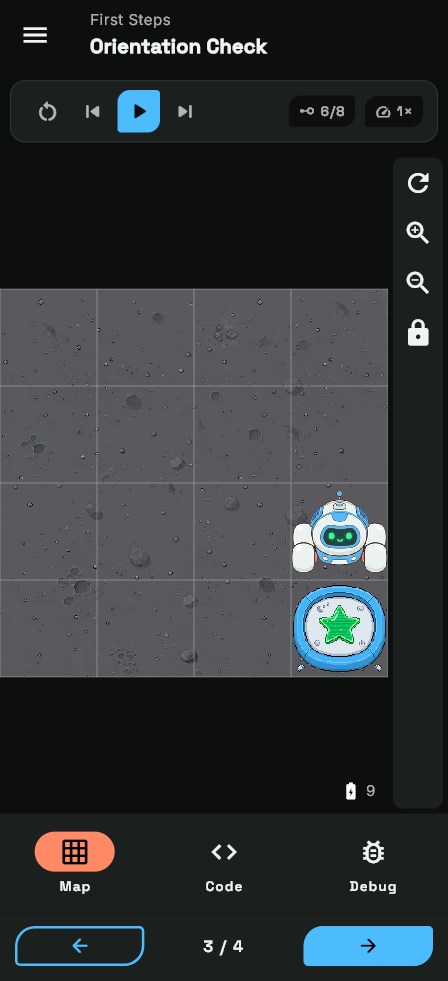
The app splits the screen into a code editor and a grid where a rover sits. Running a script steps the rover through the grid tile by tile, and switching to the debug view lets a student scrub backward and forward through everything that already happened instead of only seeing where the rover ended up. The panel on the right also exposes the rover’s own sensors (position, facing, energy, what’s directly ahead) so a script can react to them instead of assuming the layout of the grid.
Where the actual engineering happens
lua_native is the part of the project doing the actual language integration work, and it is the piece this case study spends the most time on. The official Lua interpreter is a C library that knows nothing about Dart, so every function call that crosses that boundary has to survive mismatches that Dart’s FFI does not solve by itself.
Two ways to talk to the engine
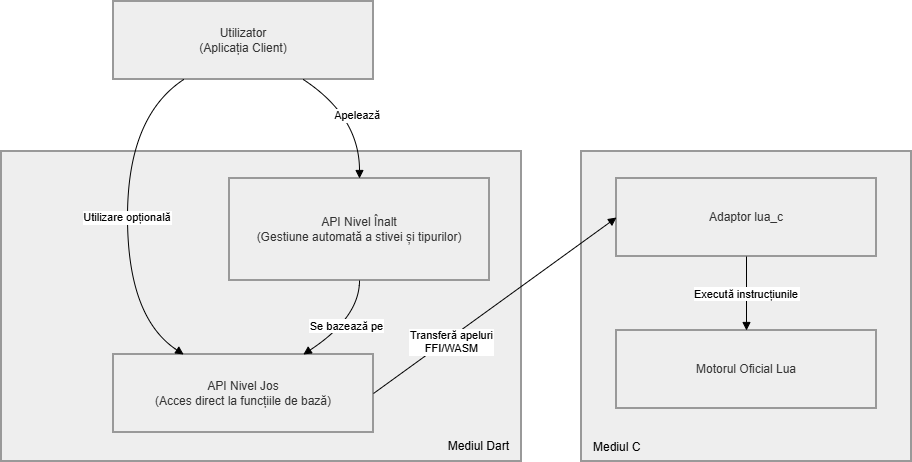
lua_native exposes the same engine through two layers. The low level API maps Lua’s C functions one to one (lua_pushnumber, lua_getglobal and so on) for anyone who wants direct control over the stack.
Sitting above it, LuaStateEnhanced is the layer the app actually uses day to day: it converts Lua tables to and from Dart Maps and Lists automatically, tracks references so a Lua table can be handed back to Dart as a live, mutable object, and wraps common operations (calling a function, registering a callback, reading a global) so most call sites never touch the stack directly.
Keeping a Lua panic from killing the app
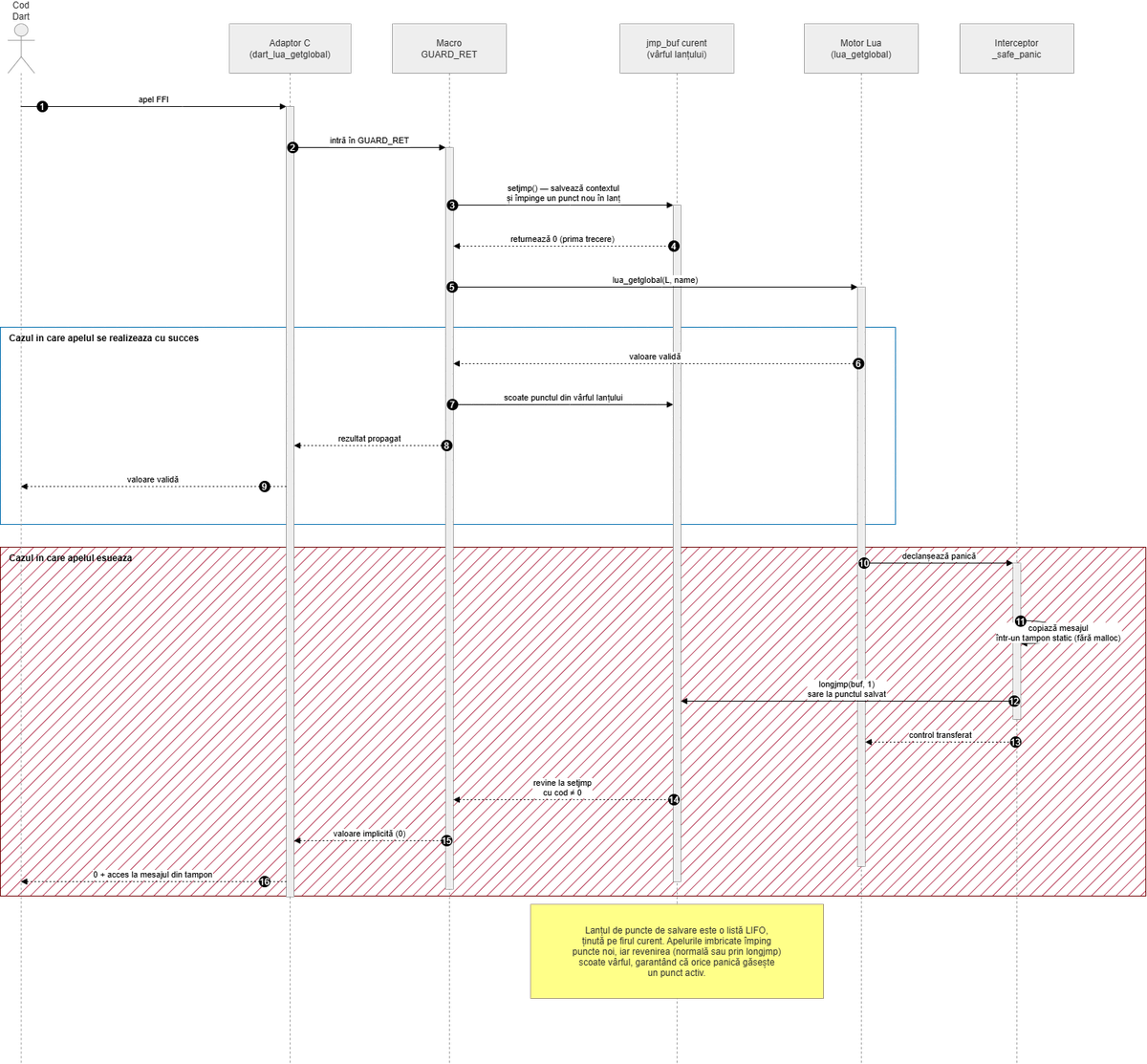
If the Lua engine hits a fatal error outside of a protected call, its default behavior is to call the C standard library’s abort, which would take down the entire host application with no stack trace and no chance to recover.
The adapter replaces that with its own setjmp and longjmp based guard: every function exported to Dart is wrapped in a save point, and if Lua panics, the panic handler writes the error message to a fixed buffer and jumps back to that save point instead of aborting. Dart finds out the call failed through the normal return value of lua_pcall, not through a crash.
One trampoline standing in for every callback
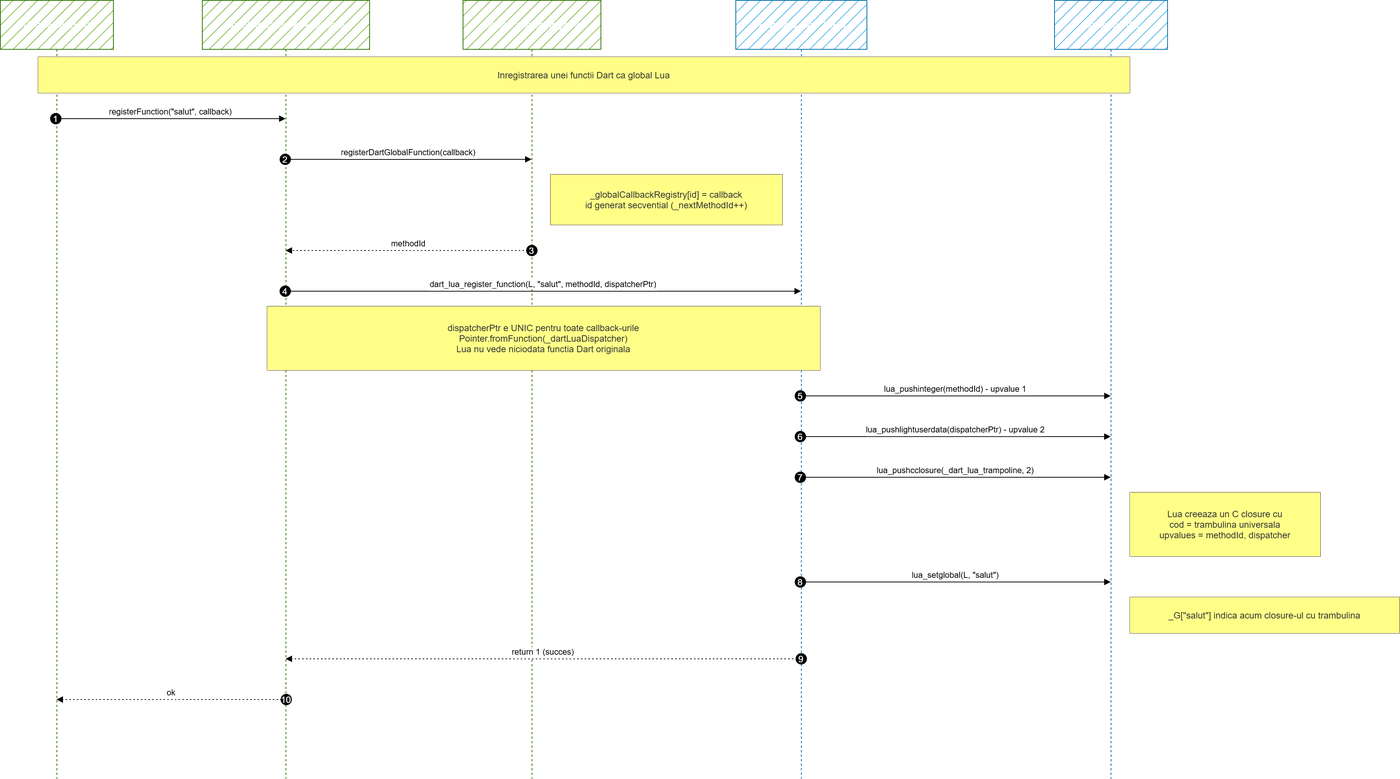
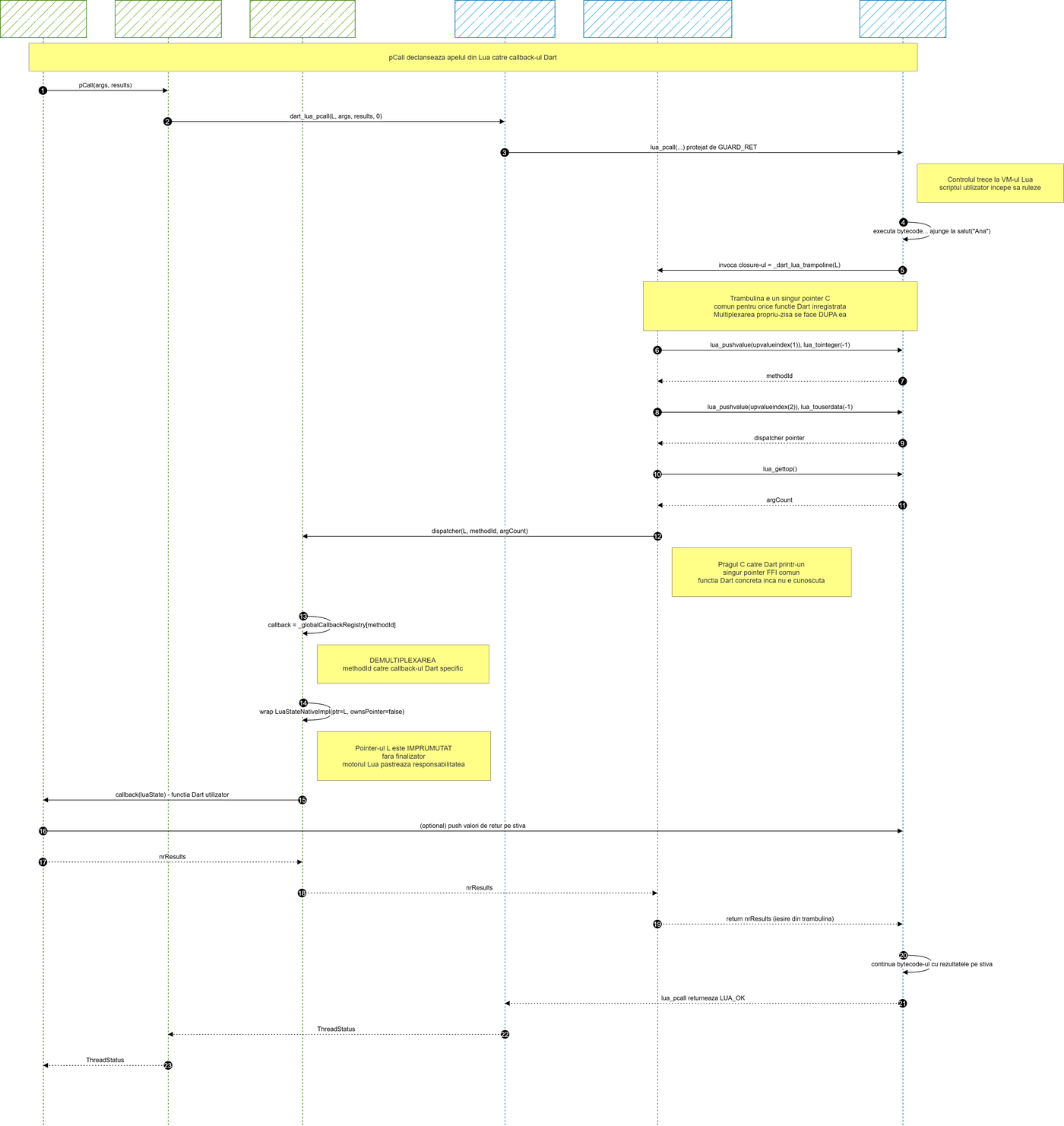
Lua scripts need to call back into Dart, to read a sensor, for example, but Dart’s FFI only lets you point Lua at a static function. It can’t hand out a distinct pointer for every callback someone registers.
So there’s just one: a single C trampoline and a single Dart dispatcher, both created once and reused for every callback. Registering a function doesn’t create a new C entry point, it just files the function under an integer id in a registry. The trampoline and dispatcher stay identical no matter how many callbacks exist, only the id changes.
That id and the dispatcher pointer travel with the Lua closure as upvalues rather than living in a shared global, since more than one Lua state can run at once and each needs its own dispatcher. When the script calls the function, the trampoline reads those two values off the stack, counts the arguments, and hands everything to the dispatcher, which looks up the real Dart function, runs it, and passes the result back down the same path.
The same header, two sets of bindings
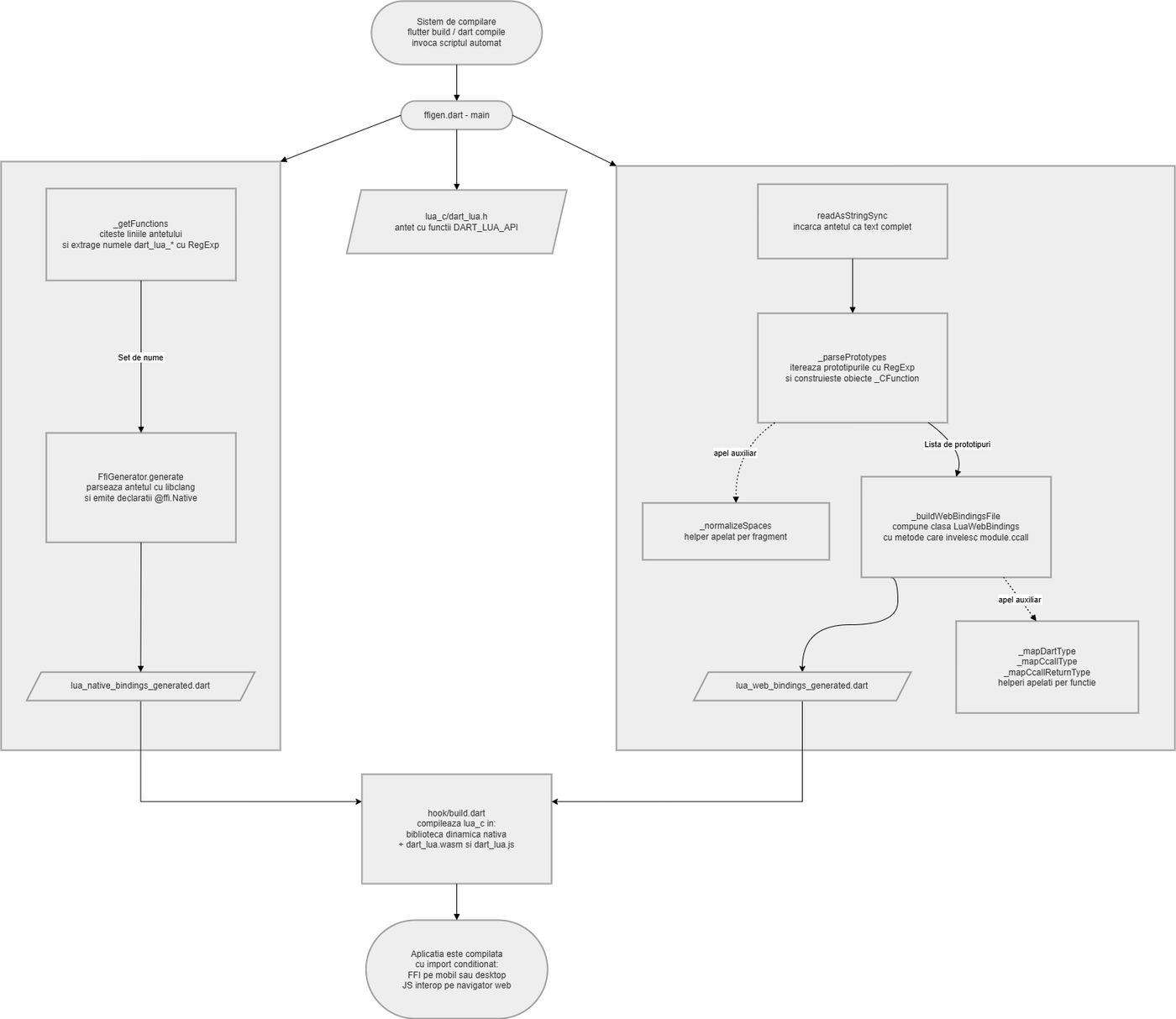
Everything the adapter exports is declared once, in dart_lua.h. A build tool reads that header twice: once through ffigen and libclang to produce native FFI bindings tied to a compiled .so, .dll or .dylib, and once through a small custom parser that emits WebAssembly bindings routed through dart:js_interop to a module built with Emscripten.
A conditional import in lua_state_factory.dart then picks whichever implementation matches the current platform, so nothing above that file has to check whether it is running natively or in a browser.
What a student actually writes
Collect every sample
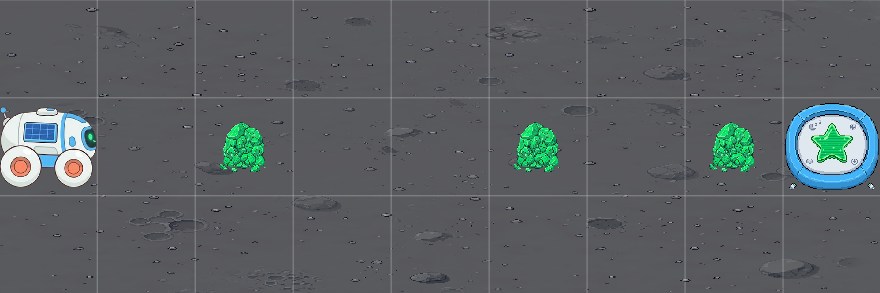
This is the script from a later mission: the rover drives straight ahead, picking up every sample tile it crosses, and stops on its own the moment the next step would take it off the grid.
Lua doesn’t require semicolons at the end of a line, blocks close with an explicit end instead of braces, and tables (Lua’s one composite data structure) index from 1 instead of 0. None of that is arbitrary: the syntax was picked because it reads more like plain instructions and less like punctuation a beginner has to memorize.
while not is_forward_outside() do
  if get_front() == SAMPLE then
    move()
    collect_sample()
  else
    move()
  end
end
A Flutter client that runs everywhere
Recording every frame instead of re-running the script
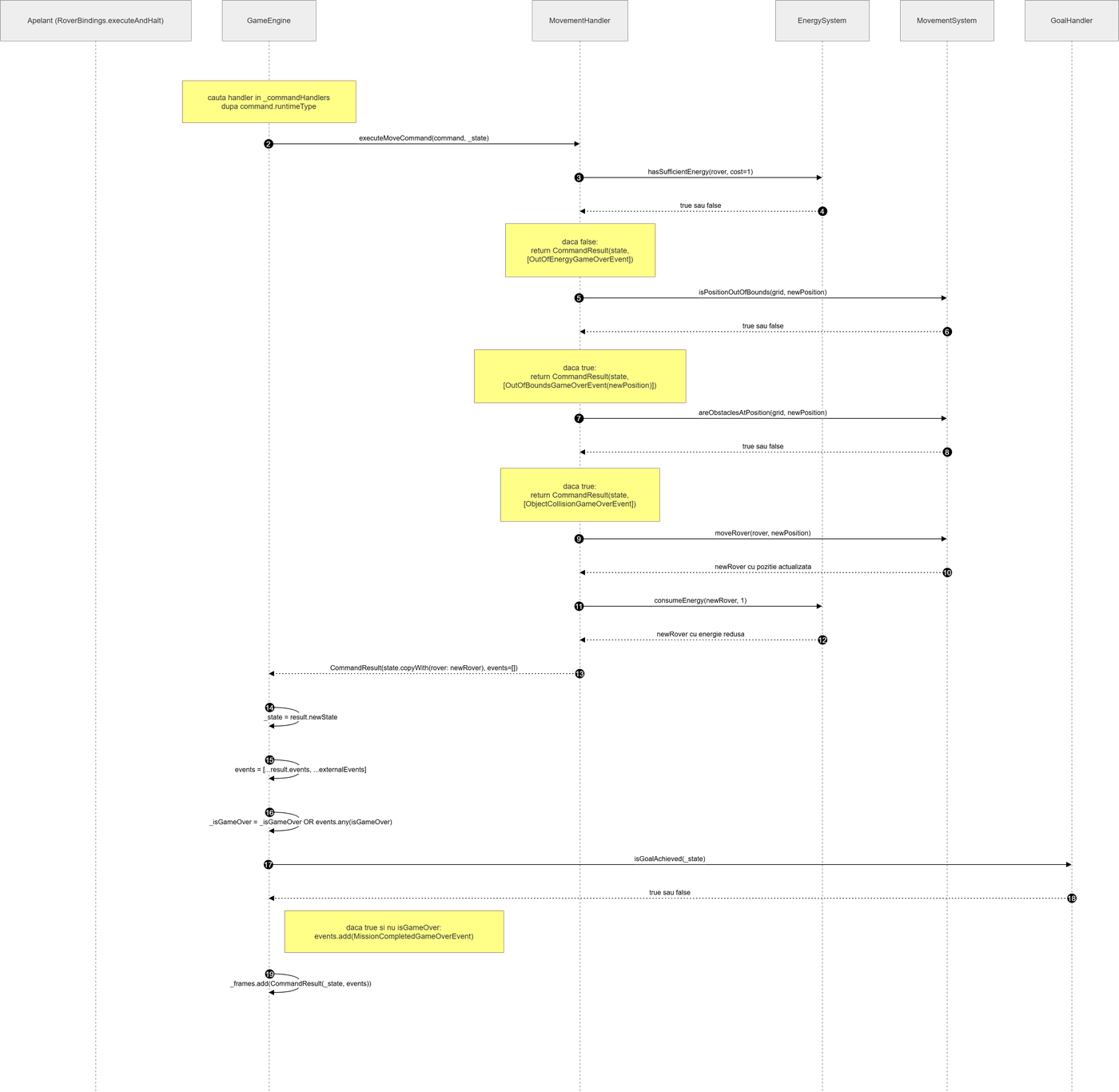
lua_rover, the Flutter client, runs a small CQRS style engine rather than executing the Lua script directly against live UI state. Each step of a run is recorded as an atomic frame, which is what lets the debug view scrub backward through an entire run: it’s replaying recorded frames, not re-executing the script from the start every time a student moves the slider. State on the Flutter side is exposed through Cubit rather than the full Bloc pattern, since most screens only need a direct function call to trigger a state change, not a stream of events.
Cross-platform from one codebase
The client is one Flutter codebase for phone, tablet, desktop and the browser, but a phone screen can’t show the grid, the editor and the debugger at once the way a tablet or a desktop window can. Below a width breakpoint the layout collapses into a bottom tab bar (Map, Code, Debug) instead of the three pane view, so a student switches between them explicitly instead of everything getting cramped. The code editor needed the same kind of accommodation: an earlier package worked fine on desktop but fought with the on screen keyboard and autocomplete on Android and iOS, so the client now uses re_editor, which handles mobile input correctly and still highlights syntax off an abstract syntax tree.
That split lives at the one screen that needs it, not in a global theme: the lab feature has separate desktop and mobile body widgets picked by width, sharing the same LabCubit underneath. Resizing the window just swaps which body renders, it doesn’t touch the running script or the recorded frames. Every other screen follows the same pattern, so there’s one consistent way the app adapts to screen size instead of each screen inventing its own.
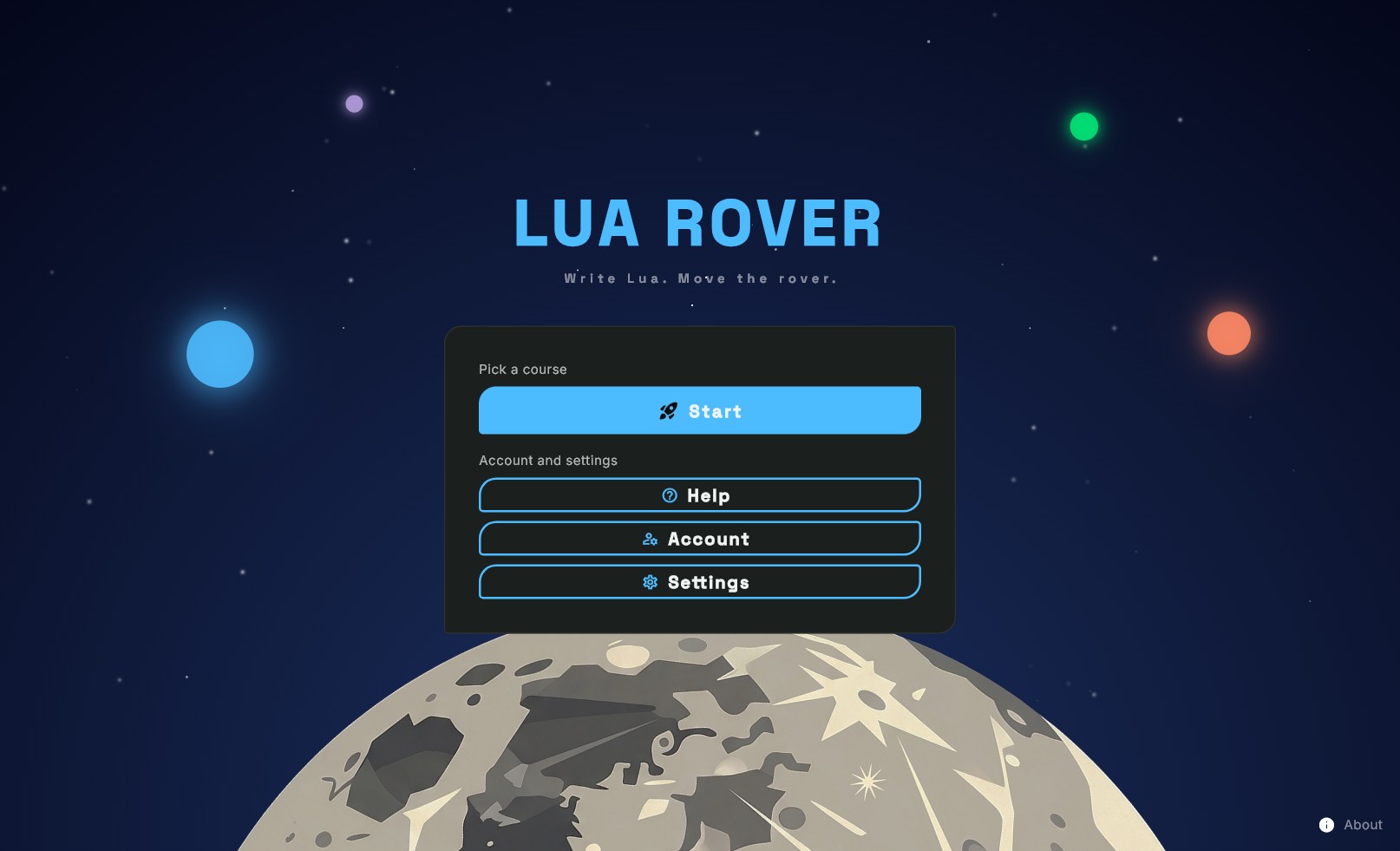
The main menu goes through the same adaptive treatment shown in the screenshot: on a wide screen it lays out as a card grid with room for descriptions and progress previews, but below the breakpoint it collapses to a single stacked column with larger touch targets, since a phone doesn’t reward small hit areas the way a desktop pointer does. Account state and course progress are pulled from the same api_client package regardless of screen size, so switching from a phone to a tablet mid lesson picks up exactly where the last device left off, with no separate mobile backend or duplicated sync logic involved.
What runs on the server
Clean Architecture, JWT, and packages generated for offline use
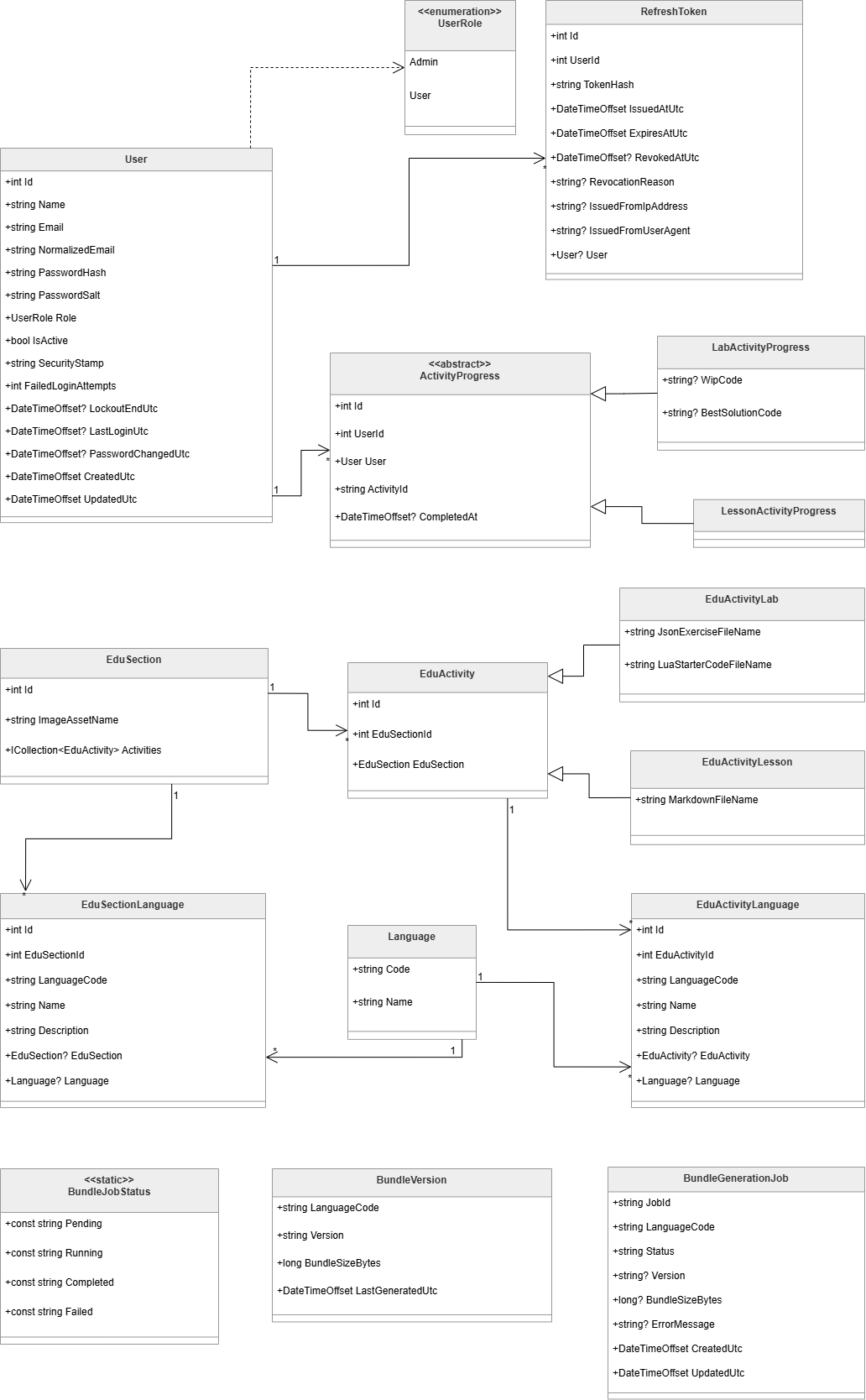
LuaRoverBackend is an ASP.NET Core service built around Clean Architecture: domain entities with no framework dependencies, application layer interfaces and DTOs, EF Core repositories implementing those interfaces, and controllers on top that only ever depend on interfaces, never on EF Core directly. JWT auth follows the same shape, handled as middleware ahead of the controllers, so an admin only endpoint is just an [Authorize(Roles = "Admin")] attribute instead of a manual check in every action.
The offline requirement mostly shows up in content delivery. Each language’s courses, activities and translated text get zipped into a downloadable bundle, and building one runs as a background job instead of blocking the request: triggering a rebuild returns a 202 right away with a job id you can poll for status. Downloads are ETag aware too, so a client that already has the current bundle gets a 304 instead of re-downloading a multi-megabyte archive that hasn’t changed.
Refresh tokens you can revoke
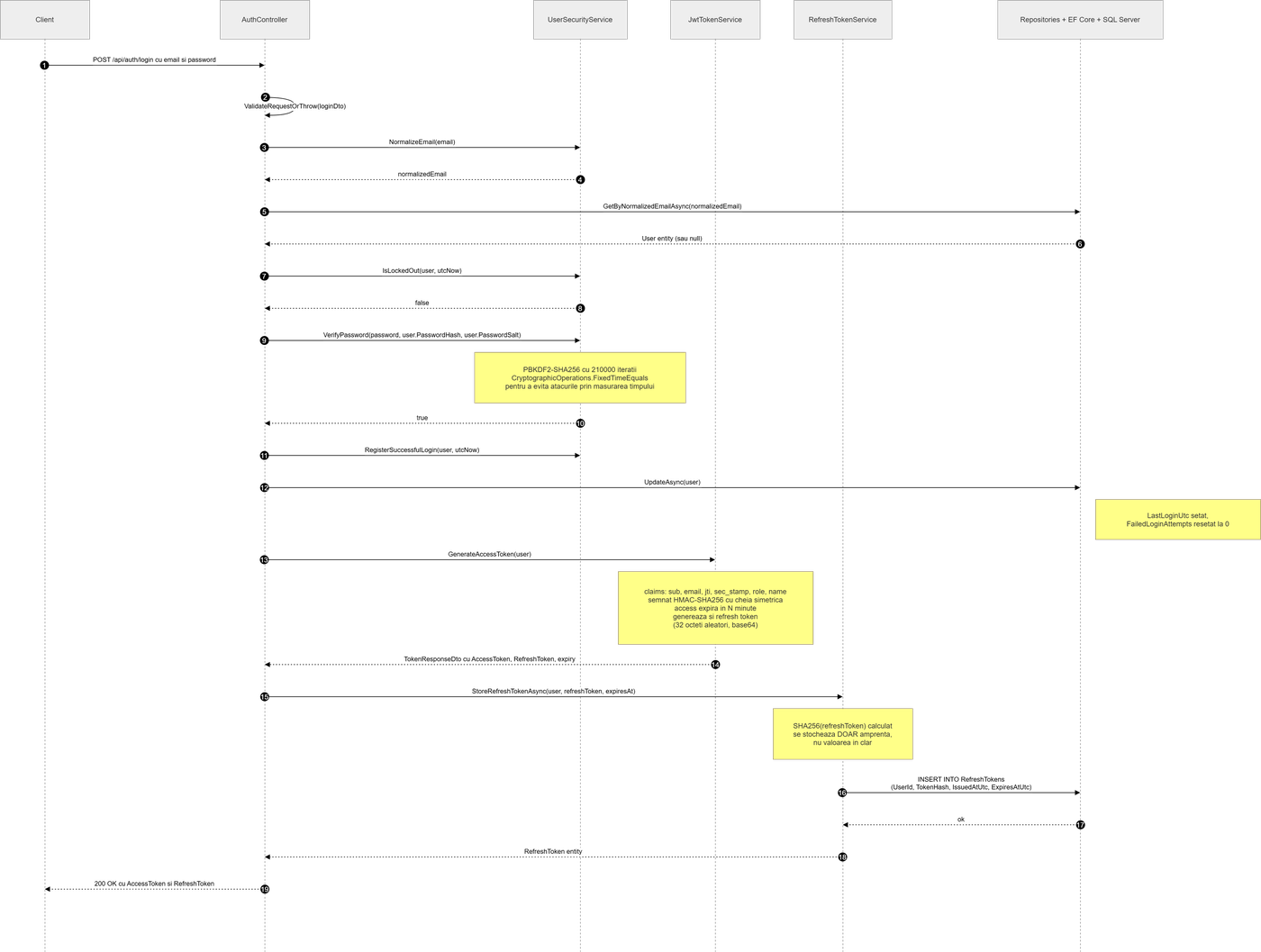
Logging in returns two tokens: a short lived JWT access token and a longer lived refresh token. The access token is what gets checked on every request, so it never touches the database, but the refresh token is stored, and only as a SHA-256 hash, alongside the IP address and user agent it was issued from and fields for when it expires or gets revoked. When a client asks for a new access token, the server hashes the refresh token it received and compares that to the stored hash rather than comparing raw values, and can invalidate a session immediately by setting a revoked timestamp without waiting for the token to expire on its own.
What the test suites cover
A script a student writes has to behave the same way whether it runs through FFI on a phone or through WebAssembly in a browser, so both implementations of lua_native are tested against the same suites.
- 770+ Automated tests across the three projects
- 96.8% lua_native coverage, native and web
- 100% lua_bridge coverage